
Professional services firms
Run multiple branches or offices from one system. Track projects, time and resources, bill accurately and see profitability by branch, team or client.
Business Central is Microsoft’s cloud ERP for mid-sized businesses. It connects finance, sales, inventory, projects and service in one system that works with Outlook, Excel and Teams.
BusinessHub brings more than 20 years of Australian ERP experience to help you choose it, implement it and get the most from it.
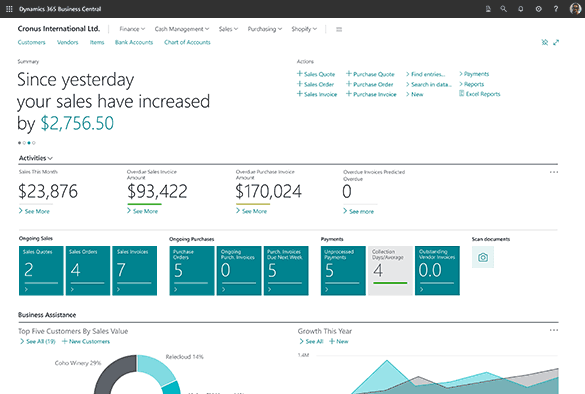
Microsoft Dynamics 365 Business Central is an all-in-one business management system (ERP) for small and mid-sized organisations. It replaces disconnected accounting software, spreadsheets and standalone tools with a single cloud platform, so every team works from the same real-time data.
All-in-one business management
Financials, supply chain, sales, projects and service all work together in one system.
Built for growth
Start with what you need and add users, companies and capabilities as you grow.
Anywhere, anytime
Cloud-based and mobile-ready, so you can run your business from the office, the warehouse or the road.
Backed by Microsoft
Trusted by more than 55,000 companies worldwide, with Microsoft’s security, reliability and ongoing investment in AI.
Automate payables and receivables, close the month faster and get real-time financial reporting across every company and branch.
Manage quotes, orders and customer pipelines, with sales data connected straight to finance and inventory.
Know what you have, where it is and when to reorder, across multiple locations and warehouses.
Plan jobs, track time and costs, and bill accurately, with live visibility of project profitability.
Business Central Premium adds manufacturing and service management for businesses that make products or run service operations.
Use Copilot and AI agents, such as the Payables Agent and Sales Order Agent, to cut manual data entry and speed up everyday tasks.
Source: Microsoft-commissioned Business Central study by Forrester Consulting. Results are for a composite organisation. Read more on Microsoft’s website.
Business Central gives growing businesses the depth of a full ERP with the familiarity of Microsoft 365. Here is what that looks like day to day.
Copilot is included with Business Central Essentials and Premium. Use it to draft content, analyse data and speed up routine tasks. AI agents such as the Payables Agent and Sales Order Agent can take on invoice processing and order entry (agents use Copilot Credits, sold separately).
Business Central works with the Microsoft 365 apps your team already uses, so there is less re-keying and less switching between screens. Staff with a Microsoft 365 licence can view Business Central data in Teams at no additional charge.
Run multiple companies and branches in one system, with support for consolidations, intercompany transactions, multiple currencies and exchange rates. It is built for groups that have outgrown one set of books.
Remove data silos with role-based dashboards, flexible reports and KPIs for every team. Connect to Power BI when you want deeper analysis across the business.
Business Central runs on Microsoft’s cloud, with identity protection, role-based access and encryption to keep your data secure and help you meet compliance requirements.
Add industry and business apps from Microsoft AppSource, and connect Business Central to the systems you already rely on, such as payroll, eCommerce and banking.
Run multiple branches or offices from one system. Track projects, time and resources, bill accurately and see profitability by branch, team or client.
Manage stock across warehouses, control purchasing and pricing, and fulfil orders faster with real-time inventory.
Plan production, manage bills of materials and track costs with Business Central Premium.
Connect online and in-store sales with inventory and finance, so stock levels and margins are always up to date.
Consolidate results across companies, handle intercompany transactions and trade in multiple currencies.
Get more from Outlook, Excel and Teams with an ERP that works inside the tools your team already uses every day.
Relying on add-ons, workarounds and spreadsheets to make Xero or other entry-level software fit? That is a clear sign you are ready for an ERP.
Replace separate finance, inventory and CRM tools with one source of truth, and stop re-keying the same data.
Add users, companies and capabilities as you grow, without the cost and disruption of changing systems again.
Business Central is licensed per user, per month, on an annual subscription. Most businesses use a mix of licence types to match how each person works in the system.
Licences are only part of the picture. Your total investment depends on:
Want a clear estimate for your business? Talk to our team for a tailored quote.
A successful ERP project takes more than switching on new software. Our consultants work alongside your team at every stage, so Business Central fits the way you work from day one.
Wiise is an ERP built on Microsoft Dynamics 365 Business Central by Australian company Wiise Software, and localised for Australian and New Zealand businesses. It comes with ANZ features ready to go, including GST and BAS reporting, Single Touch Payroll, Fair Work award payroll and hosting in Microsoft’s Australian data centres.
Choose Business Central if you want Microsoft’s standard global edition, operate in more than one country, or prefer to tailor your setup with add-ons.
Choose Wiise if you want a Business Central-based ERP set up for Australian compliance and payroll from day one.
Not sure which is right for you? BusinessHub implements both, so we will recommend the best fit for your business.
Tell us about your business and what you need from your next ERP. A BusinessHub consultant will be in touch to talk through Business Central, licensing and your next steps.
Prefer to talk now? Call 1300 733 071.
Business Central is Microsoft’s cloud ERP for small and mid-sized businesses. It brings finance, sales, purchasing, inventory, projects and service into one system, and works with Microsoft 365 apps like Outlook, Excel and Teams.
Business Central is licensed per user, per month, on an annual subscription, with Essentials, Premium and Team Members licences. Your total cost also depends on implementation scope, data migration, integrations, training and support. Call BusinessHub on 1300 733 071 for a tailored quote.
Essentials covers core finance, sales, purchasing, inventory, warehousing, projects and CRM. Premium includes everything in Essentials, plus manufacturing and service management.
Yes. Business Central supports multiple companies, consolidations, intercompany transactions and multiple currencies, along with project, time and resource management. That gives firms with several branches or offices one connected view of their finances and project profitability.
Yes. Business Central works with Outlook, Excel and Teams. Staff with a Microsoft 365 licence can view Business Central data in Teams at no additional charge, and Copilot is included with Essentials and Premium licences.
Wiise is built on Business Central and localised for Australia and New Zealand, with features such as GST and BAS reporting and Single Touch Payroll ready to go. Business Central is Microsoft’s standard global edition. BusinessHub implements both and can recommend the right fit. Learn more about Wiise.
Yes. BusinessHub can migrate key data such as customers, suppliers, items and opening balances from your current system, then connect the apps you still need. Not sure if you have outgrown Xero? Visit our Xero Hub.
It depends on your scope, the number of users and how much data migration and integration work is involved. We map out a clear plan and timeline during discovery, before any build work begins.
Yes. Microsoft offers a free 30-day trial of Business Central. For a guided look at how it would work for your business, talk to our team.